
Surveillance industrielle haute précision de la température sur les lignes de production en 10 minutes avec le MSX-E3211 et Python

5–7 minutes

Les lignes de production industrielles, notamment dans l’agroalimentaire, les usines chimiques, l’extrusion des plastiques et le traitement des métaux, nécessitent une surveillance continue et haute précision de la température dans plusieurs zones. Les fours de polymérisation, les tunnels de refroidissement, les filières d’extrusion et les réacteurs chimiques exigent tous des données de température précises et en temps réel afin de garantir la qualité des produits et la sécurité des processus.

Les intégrateurs et les constructeurs de machines ont besoin d’une approche rapide, ouverte et économique, s’intégrant parfaitement aux outils modernes d’analyse de données.

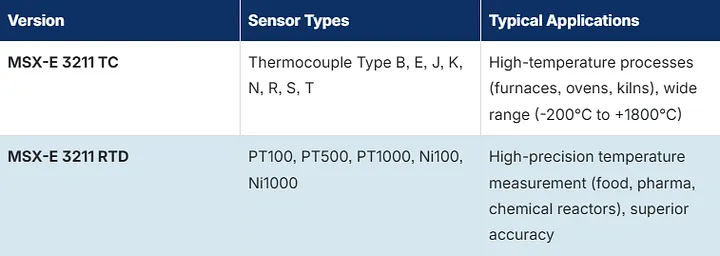
Le MSX-E3211 offre 16 canaux de mesure de température de qualité industrielle via Ethernet. Disponible en deux versions, le module couvre pratiquement tous les scénarios de surveillance industrielle de la température :

  • RTD (PT100/PT500/PT1000) pour les applications haute précision
  • Thermocouple (types B/E/J/K/N/R/S/T) pour les plages de température étendues

Associé à notre API SOAP Python open source, il permet aux utilisateurs de passer du déballage à l’acquisition de données en direct en moins de 5 minutes, sans logiciel propriétaire.

Caractéristiques principales :

  • 16 canaux de température par module
  • Versions RTD et thermocouple disponibles
  • Connectivité Ethernet industrielle (SOAP via HTTP)
  • API Python ouverte
  • Détection automatique du type de capteur (RTD ou TC)
  • Compatible avec l’ensemble de l’écosystème Python : matplotlib, pandas, CSV et API cloud

Connectez le MSX-E3211 à votre réseau Ethernet. Le module est livré avec une adresse IP par défaut. Configurez-le en fonction de votre réseau à l’aide d’ADDI-DATA ConfigTools.

1. Recherche automatique des systèmes MSX-E

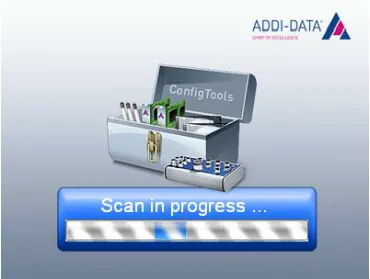
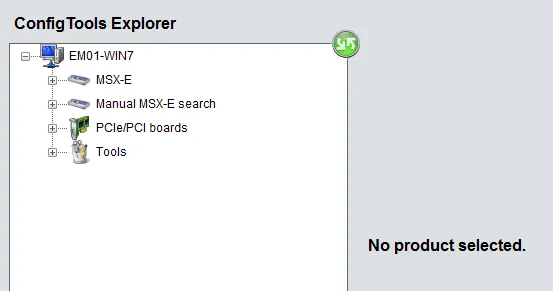
Au démarrage, ConfigTools scanne le réseau. Tous les systèmes MSX-E détectés sont répertoriés dans la fenêtre “Navigateur ConfigTools”.
Pour effectuer une nouvelle analyse, cliquez sur l’icône verte située dans le coin supérieur droit de la fenêtre « Navigateur ConfigTools ». Cliquez sur le système MSX-E que vous souhaitez administrer.

2. Vue d’ensemble de la fenêtre ConfigTools

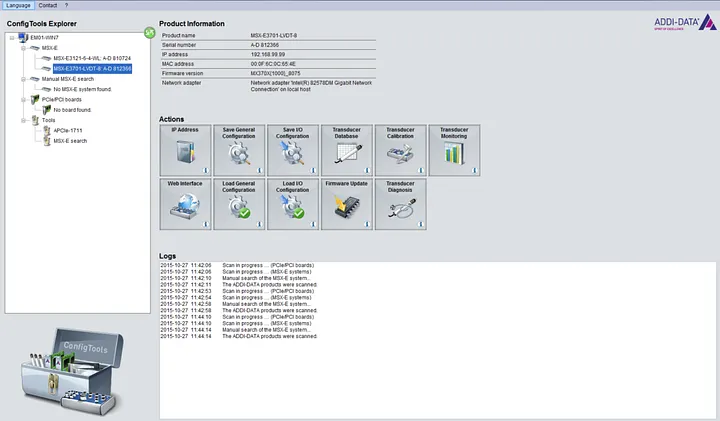
Dans la section "Informations produit", vous trouverez les informations sur le système MSX-E sélectionné : numéro de série, adresse IP, version du firmware, etc..

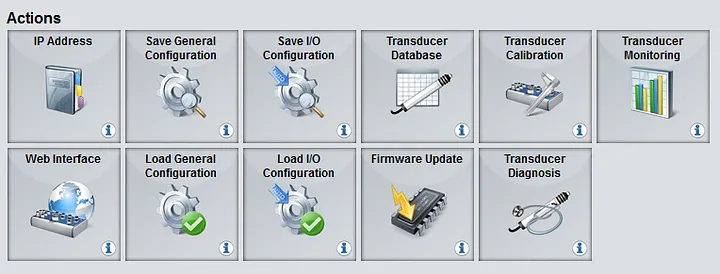
3. Actions et fonctions disponibles du système MSX-E

Vous trouverez toutes les fonctions disponibles dans la section "Fonctions"..

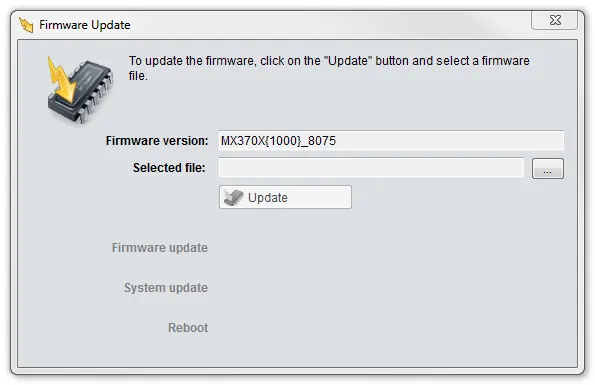
4. Mise à jour du firmware

Le firmware peut être mis à jour via l’outil “Mise à jour firmware”. Les firmwares sont téléchargeables depuis la section de téléchargement.

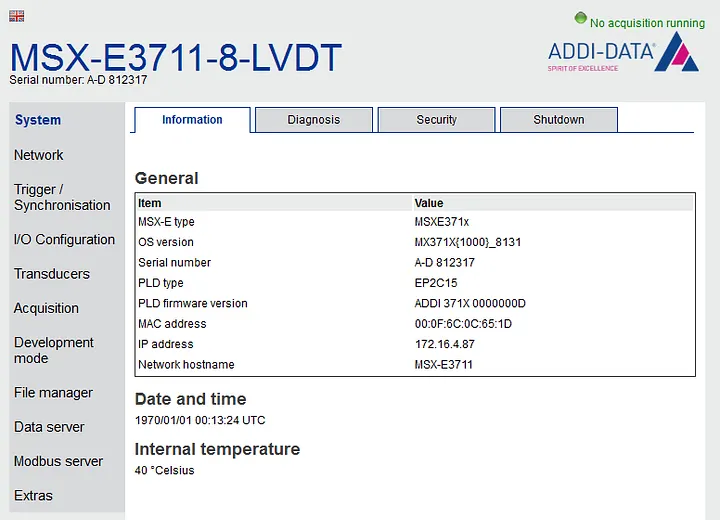
5. Configuration du système via l’interface web

Accédez à l’interface web via le bouton “Interface web”. Cette interface permet de configurer l'acquisition (choix des voies de mesure, fréquences d’acquisition, fonctions triggers, etc.). Le bouton "Sauvegarder la configuration générale" permet de sauvegarder les paramètres généraux. Le bouton "Sauvegarder la configuration des E/S" permet de sauvegarder la configuration spécifiques des entrées/sorties du système.

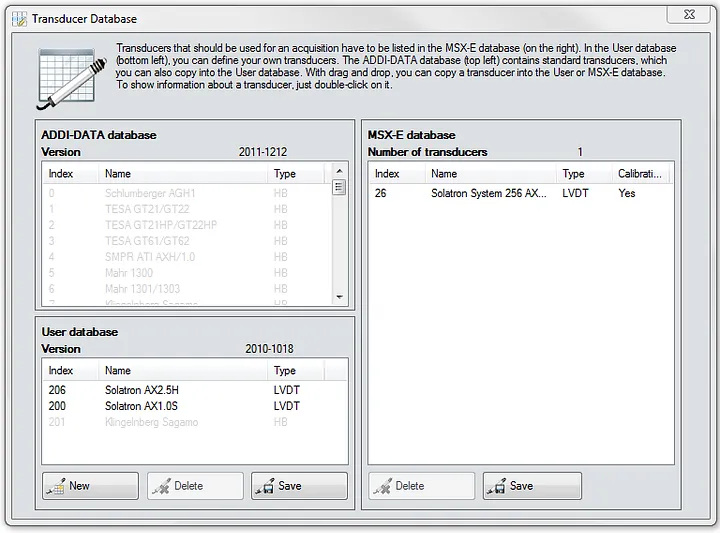
6. ConfigTools pour les systèmes d’acquisition équipés de transducteurs inductifs

ConfigTools comprend une base de données de transducteurs inductifs qui peut être mise à jour et complétée. Le transducteur doit être présent dans la base de données pour que le système puisse le reconnaître. Les transducteurs peuvent être calibrés pour un ou plusieurs canaux, les canaux à acquérir peuvent être choisis et visualisés. ConfigTools permet aussi un contrôle d’erreurs courantes (courts-circuits ou ruptures de ligne).

Installez la bibliothèque cliente SOAP pour Python :

pip install zeep

Exécutez le code Python suivant pour lire les températures des 16 canaux :

"""Sample: Temperature polling on the MSX-E 3211.
Demonstrates:
  - Querying the number of temperature channels
  - Auto-detecting sensor class (RTD, TC, or NTC) per channel
  - Configuring channels with appropriate types
  - Starting auto-refresh acquisition
  - Polling temperature values at regular intervals
  - Stopping acquisition
Works with both thermocouple (TC) and RTD versions of the MSX-E 3211.
"""
import sys
import time
sys.path.insert(0, "../..")
from msxe_api import MSXE3211API
from msxe_api.msxe import MSXEError
from msxe_api.msxe3211 import TC_TYPE_K, RTD_PT100, REFRESH_UNIT_MS
MSXE_ADDRESS = "192.168.99.99"
MSXE_PORT = 5555
POLL_INTERVAL_S = 1.0   # seconds between each poll
POLL_COUNT = 10          # number of readings
def main():
    msxe = MSXE3211API(MSXE_ADDRESS, MSXE_PORT)
    # ── Auto-detect sensor class and configure all channels ──────
    counts = msxe.configure_all_channels(tc_type=TC_TYPE_K, rtd_type=RTD_PT100)
    print(f"Configured: {counts}")
    # ── Show current configuration ───────────────────────────────
    num_channels = msxe.temperature_get_number_of_channels()
    msxe.print_channel_configuration()
    # ── Start auto-refresh (all channels, 500 ms refresh) ───────
    channel_mask = (1 << num_channels) - 1
    msxe.auto_refresh_start(
        channel_mask=channel_mask,
        refresh_time=500,
        refresh_time_unit=REFRESH_UNIT_MS,
        force_start=1,
    )
    print(f"\nAuto-refresh started (mask=0x{channel_mask:04X}, 500 ms)")
    # ── Poll temperature values ──────────────────────────────────
    print(f"\nPolling {POLL_COUNT} readings, {POLL_INTERVAL_S}s apart:")
    print("-" * 60)
    header = "  Time  |" + "".join(f"  Ch{ch:2d}  " for ch in range(num_channels))
    print(header)
    print("-" * 60)
    for i in range(POLL_COUNT):
        ts_low, ts_high, counter, values = msxe.auto_refresh_get_values(blocking=1)
        row = f" {i * POLL_INTERVAL_S:5.1f}s |"
        for ch in range(min(num_channels, len(values))):
            row += f" {values[ch]:6.1f}°"
        print(row)
        time.sleep(POLL_INTERVAL_S)
    # ── Stop auto-refresh ────────────────────────────────────────
    msxe.auto_refresh_stop()
    print("\nAuto-refresh stopped")
if __name__ == "__main__":
    try:
        main()
    except KeyboardInterrupt:
        print("\nInterrupted — stopping acquisition")
        msxe = MSXE3211API(MSXE_ADDRESS, MSXE_PORT)
        msxe.auto_refresh_stop()
    except MSXEError as e:
        print(f"MSXE error: {e}")
    except Exception as e:
        print(f"Connection error: {e}")

Téléchargez notre exemple de tableau de bord sur GitHub :

Installez matplotlib et exécutez l’exemple de tableau de bord pour visualiser les données en temps réel :

pip install matplotlib
python sample_temperature_dashboard.py

Une fenêtre graphique s’ouvre et affiche les 16 canaux de température actualisés en temps réel. Fermez la fenêtre pour arrêter l’acquisition.

Téléchargez notre exemple de tableau de bord sur GitHub :

Enregistrez tous les canaux dans un fichier CSV en vue de leur analyse dans Excel, pandas ou tout autre outil de Business Intelligence :

python sample_temperature_csv_logger.py

Le programme génère un fichier CSV horodaté comprenant une ligne par mesure et une colonne par canal, prêt à être importé dans n’importe quel outil d’analyse.

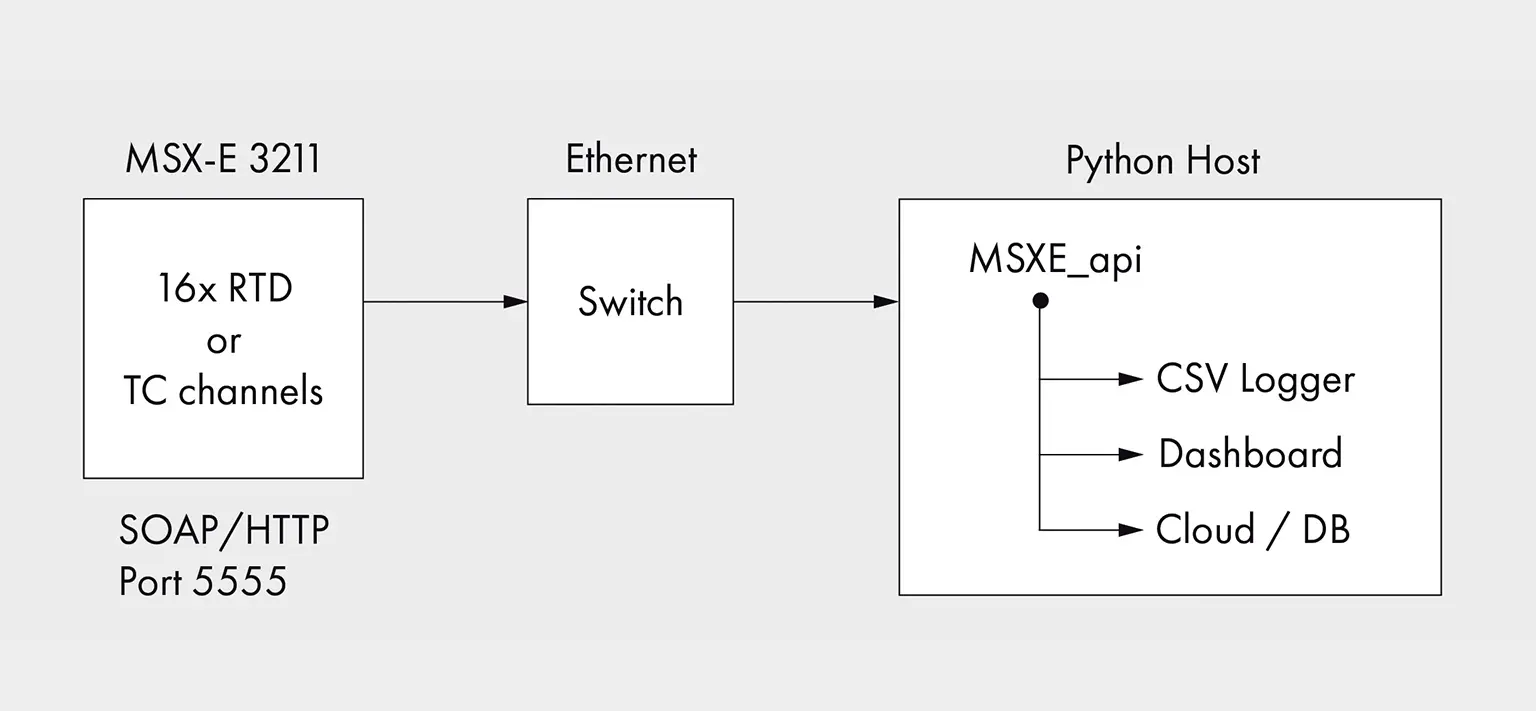
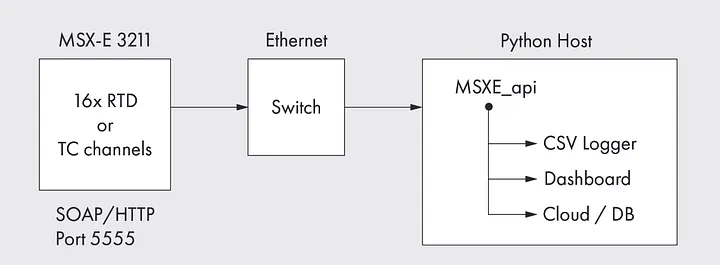
L’architecture du système est simple et modulaire :

Plusieurs modules MSX-E3211 peuvent être connectés au même réseau. Chaque module est identifié par son adresse IP. L’API Python gère la communication SOAP de manière transparente.

L’API Python est conçue pour être simple à utiliser. Voici les principales opérations :

  • configure_all_channels(): détecte automatiquement le type RTD ou TC et configure les 16 canaux en un seul appel
  • auto_refresh_start() / get_values() / stop(): acquisition continue avec fréquence d’actualisation configurable
  • temperature_diagnostic(): vérifie l’état du capteur pour chaque canal
  • print_channel_configuration(): affiche la configuration actuelle en un coup d’œil

En cas d’échec, toutes les opérations déclenchent une exception MSXEError accompagnée de codes d’erreur explicites. L’API prend en charge les versions RTD et thermocouple avec le même code.

  • API ouverte : aucun logiciel propriétaire ni frais de licence
  • Écosystème Python : intégration avec pandas, matplotlib, Grafana, InfluxDB ou toute plateforme cloud
  • Intégration rapide : des données en direct 5 minutes après le démarrage
  • Qualité industrielle : montage sur rail DIN, plage de température étendue et 16 canaux par module
  • Flexibilité : RTD pour la précision, thermocouple pour les températures élevées, avec la même API
  • Évolutivité : connexion de plusieurs modules au même réseau Ethernet

Téléchargez l’API Python et les exemples depuis notre dépôt GitHub :

Pour toute assistance technique, veuillez nous contacter à l’adresse suivante : [email protected]


Pour en savoir plus sur le MSX-E3211, vous trouverez des informations complémentaires directement sur la page du produit.


SOLUTIONS ADDI-DATA

Cartes d'acquisition
• Pour différents types de signaux
• Haute précision
• Robuste et résistant aux interférences
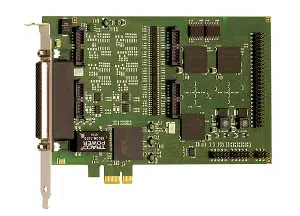
apcie-1711 PC board

Systèmes temps réel
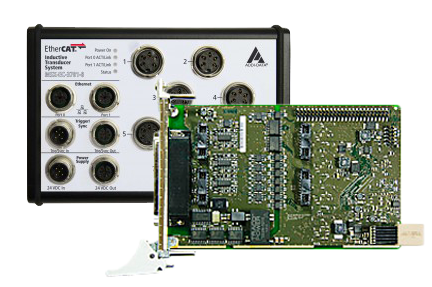
• EtherCAT et Profinet
• Systèmes Linux avec extension temps réel
• Cartes PC avec pilotes RTX temps réel
Systèmes Ethernet
• Connexion directe des capteurs
• Pour une utilisation sur le terrain, degrés de protection jusqu’à IP 67
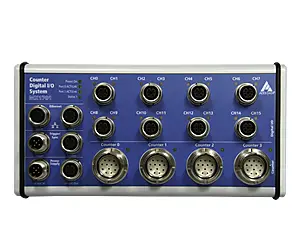
MSX-E1701 fieldbus system

Enregistreurs de données
• Enregistrement de longue durée de nombreux types de signaux
• Configuration du point de mesure sans connaissances en programmation
• Visualisation des données en direct
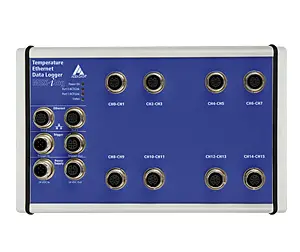
intelligent data loggers MSX-ilog

Solutions sur mesure

La meilleure solution est souvent une solution sur mesure. En tant que fabricant, nous pouvons vous proposer des solutions adaptées à vos besoins de manière rapide et efficace. C'est avec plaisir que nous vous conseillons afin de trouver la solution idéale pour votre application. Nous procédons également aux adaptations ou aux développements nécessaires.
Contactez-nous !

TOP

To access this Product Notification file, please enter your email address.

You will have immediate access to the document.

Download - EOL-AD-2608001 - APCI-1710 - End of Life / Discontinuation Notice

To access this CAD Model, please enter your email address.

You will have immediate access to the file.

Download - CAD Model - CPCIs-1712 - Rev A

To access this CAD Model, please enter your email address.

You will have immediate access to the file.

Download - CAD Model - APCIe-1712 - Rev A

To access this Product Notification file, please enter your email address.

You will have immediate access to the document.

Download - PCN-AD-2609004 - APCIe-2032 - Rev C to Rev E

To access this Product Notification file, please enter your email address.

You will have immediate access to the document.

Download - PCN-AD-2609001 - APCIe-1532 - Rev C to Rev E

To access this Product Notification file, please enter your email address.

You will have immediate access to the document.

Download - PCN-AD-2609002 - APCIe-1516 - Rev C to Rev E

To access this Product Notification file, please enter your email address.

You will have immediate access to the document.

Download - PCN-AD-2609003 - APCIe-1032 - Rev C to Rev E

Do you need this MTBF calculation report?

To access it, please enter your information. You will have immediate access to the file.

Download - MTBF - CPCIs-3121 - Rev B4

Do you need this MTBF calculation report?

To access it, please enter your information. You will have immediate access to the file.

Download - MTBF - CPCIs-1711 - Rev B1

Do you need this MTBF calculation report?

To access it, please enter your information. You will have immediate access to the file.

Download - MTBF - CPCIs-15xx - Rev C2.03

Do you need this MTBF calculation report?

To access it, please enter your information. You will have immediate access to the file.

Download - MTBF - APCIe-3021-16 - Rev B7

Do you need this MTBF calculation report?

To access it, please enter your information. You will have immediate access to the file.

Download - MTBF - APCIe-2200 - Rev D2

Do you need this MTBF calculation report?

To access it, please enter your information. You will have immediate access to the file.

Download - MTBF - APCIe-1711 - Rev E2

Do you need this MTBF calculation report?

To access it, please enter your information. You will have immediate access to the file.

Download - MTBF - APCI-2200 - Rev F3.03

Do you need this MTBF calculation report?

To access it, please enter your information. You will have immediate access to the file.

Download - MTBF - APCI-1712 - Rev B2

To access this CAD Model, please enter your email address.

You will have immediate access to the file.

Download - CAD Model - MSX-RDC-17 - Rev D3.01

To access this CAD Model, please enter your email address.

You will have immediate access to the file.

Download - CAD Model - MSX-EC-1730

To access this CAD Model, please enter your email address.

You will have immediate access to the file.

Download - CAD Model - MSX-E3711

To access this CAD Model, please enter your email address.

You will have immediate access to the file.

Download - CAD Model - MSX-E3701

To access this CAD Model, please enter your email address.

You will have immediate access to the file.

Download - CAD Model - MSX-E3700

To access this CAD Model, please enter your email address.

You will have immediate access to the file.

Download - CAD Model - MSX-E3601

To access this CAD Model, please enter your email address.

You will have immediate access to the file.

Download - CAD Model - MSX-E3511

To access this CAD Model, please enter your email address.

You will have immediate access to the file.

Download - CAD Model - MSX-E3311

To access this CAD Model, please enter your email address.

You will have immediate access to the file.

Download - CAD Model - MSX-E3211

To access this CAD Model, please enter your email address.

You will have immediate access to the file.

Download - CAD Model - MSX-E3011

To access this CAD Model, please enter your email address.

You will have immediate access to the file.

Download - CAD Model - MSX-E17x1

To access this CAD Model, please enter your email address.

You will have immediate access to the file.

Download - CAD Model - MSX-E1516

To access this CAD Model, please enter your email address.

You will have immediate access to the file.

Download - CAD Model - CPCIs-15xx - Rev C

To access this CAD Model, please enter your email address.

You will have immediate access to the file.

Download - CAD Model - APCIe-3121 - Rev B

To access this CAD Model, please enter your email address.

You will have immediate access to the file.

Download - CAD Model - APCIe-2200 - Rev C

To access this CAD Model, please enter your email address.

You will have immediate access to the file.

Download - CAD Model - APCIe-1711 - Rev E

To access this CAD Model, please enter your email address.

You will have immediate access to the file.

Download - CAD Model - APCIe-1500 - Rev E

To access this CAD Model, please enter your email address.

You will have immediate access to the file.

Download - CAD Model - APCI-2200 - Rev F

To access this Whitebook, please enter your email address.

You will have immediate access to the document.

Download Whitebook - The Engineer's Guide
Nom
Nom
Prénom
Nom

To access this Product Notification file, please enter your email address.

You will have immediate access to the document.

Download - PCN-AD-2608004 - APCIe-1564-5V-PNP/-NPN - Rev C to Rev E

To access this Product Notification file, please enter your email address.

You will have immediate access to the document.

Download - PCN-AD-2608003 - APCIe-040 - Rev D2.03

To access this Product Notification file, please enter your email address.

You will have immediate access to the document.

Download - PCN-AD-2608002 - APCle-2200 - RevD2.03

To access this Product Notification file, please enter your email address.

You will have immediate access to the document.

Download - PCN-AD-2608001 - APCIe-1711 - Rev E

To access this Product Notification file, please enter your email address.

You will have immediate access to the document.

Download - PCN-AD-2510001 - CPCIs-1532_1564 - RevC2

To access this Product Notification file, please enter your email address.

You will have immediate access to the document.

Download - PCN-AD-2603001 - MSX-RDC-17 - Rev D

To access this Product Notification file, please enter your email address.

You will have immediate access to the document.

Download - PCN-AD-2511005 - APCIe-1500 - RevE

To access this Product Notification file, please enter your email address.

You will have immediate access to the document.

Download - PCN-AD-2511003 - APCI-1710 - Update to APCI-1712

To access this Product Notification file, please enter your email address.

You will have immediate access to the document.

Download - PCN-AD-202606001 - APCI-2200 - Rev D to F1

To download this driver, please enter your email address.

Once submitted, the file will begin downloading automatically.

Download drivers (xPCIx-17xx)

To access this Certificate, please enter your email address.

You will have immediate access to the document.

Download certificate (PFAS)

To access this Certificate, please enter your email address.

You will have immediate access to the document.

Download certificate (AEO)

To access this Certificate, please enter your email address.

You will have immediate access to the document.

Download certificate (ISO)

To access this Certificate, please enter your email address.

You will have immediate access to the document.

Download certificate (POPs)